
- Devlog
- Escape menu and controller
Escape menu and controller
The menu brings settings and help together. Keyboard and controller reach the same tabs, while the world keeps running.
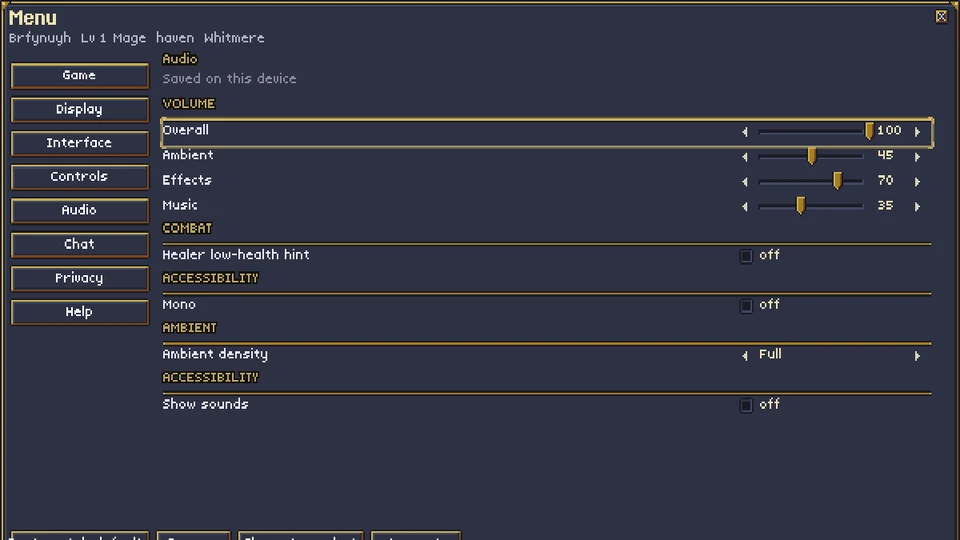
Esc opens the menu. It has eight tabs: Game, Display, Interface, Controls, Audio, Chat, Privacy and Help. The world and combat keep running while the window is open. The menu therefore does not pause the game.
On a controller, Start first opens the window list. Its “Menu” entry opens the menu on the last-used tab. LB and RB switch tabs. The D-pad moves focus up or down through rows and footer buttons; left and right change values. A confirms and B goes back. Start closes the menu and its subpages.
Individual settings can be reset directly: Y resets the focused row, and X asks for confirmation before resetting a tab. LT makes slider steps finer. On a keyboard, Delete resets the focused row and Shift makes slider steps finer.
Many settings take effect immediately and are currently stored locally on the device. Privacy and Help channel switches wait for server confirmation. Device help shows the current bindings and follows the last input used, so rebound keys remain understandable in the help. Portal links show a short URL when using a controller.
The built first-start behaviour accounts for small devices: with a shorter screen side of at most 600 CSS pixels and touch or a connected controller, the existing handheld defaults are applied once. Later player choices are preserved.
The menu and its focus paths have been built. Image selection and Harald's checks on real devices remain pending. The server timer for logging out in combat belongs to another task; this post promises neither a finished countdown nor additional One Life protection from opening the menu.
Saltwarden Online is inspired by classic MMORPGs and is not affiliated with or endorsed by any other game or its publisher.
Comments (0)
No comments yet.