
- Devlog
- Loot and inventory
Loot and inventory
Pick up loot, find it again and clear out junk at a vendor: the inventory has search, filters, sorting and a dedicated junk sale. Visual sign-off is still pending.
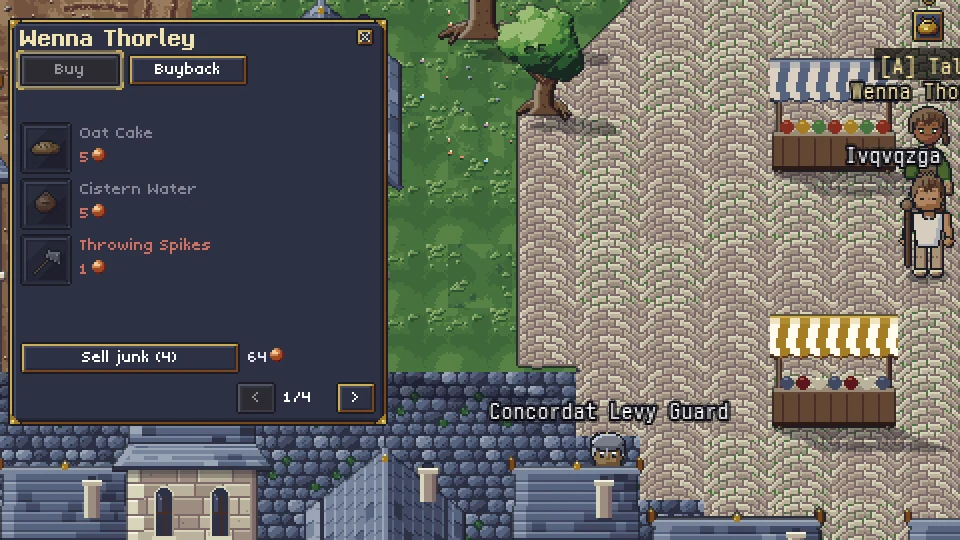
Loot does not end with a defeated enemy. It goes into the inventory and needs to be easy to find again. The existing loot window lets players take individual items or use a button to take all available loot. Several tools have been built to help with the inventory afterwards.
Inventory and bank share the same search and filters: “All”, “Gear”, “Use”, “Goods”, “Junk”, “Quest” and “Usable”. Non-matching items remain dimmed in their slots. Searching therefore leaves the grid in place. Sorting can use type, rarity, level or name; the last choice is saved locally.
New items and additions to a stack receive a brass dot. Hovering with the mouse, focusing with a controller or picking up the item clears the marker. Simply moving an item does not count as a new find. The footer counts free and total slots independently of the search filter, so available space remains visible even when a search only matches a few items.
At a vendor, “Sell junk” only sells unbound, available junk with a sale price. Grey equipment does not count as junk. The button shows the item count and sale value, and buyback is available. Its limit matters: only the last twelve sales can be bought back. Search, filters and sorting are also reachable through the existing controller focus; Y sells junk at the vendor.
These functions have been built. The documented inventory integration checked search, sorting and selling; it does not replace Harald's checks with a real controller or visual sign-off on the images. Open findings about the readability of interface colours also remain part of sign-off. This post describes the current work rather than promising a fully checked inventory.
Saltwarden Online is inspired by classic MMORPGs and is not affiliated with or endorsed by any other game or its publisher.
Comments (0)
No comments yet.